XTB referral code
 Martin Krpenský
Looking for a referral code for XTB? During registration you can enter STARTXTB. In the UK the code currently comes with no reward and no educational materials — for now it simply acts as a partner referral code. Rewards tied to the code aren't available in every country yet; if anything changes, we'll update this page right away.

Is the XTB referral code worth it?
In the UK, the STARTXTB code currently comes with no reward and no bonus educational materials — for now it is purely a partner referral code. So don't pick XTB just to “get something” for entering it.
The real value is in the pricing. XTB charges 0% commission on real stocks and ETFs up to €100,000 of monthly turnover. Depending on how much you trade, that alone can save you tens — even hundreds — of pounds over time compared with brokers that charge a fee on every trade. Above the €100,000 monthly threshold a 0.2% commission applies (minimum £10 / €10).
Rewards tied to the code aren't available in every country yet. If XTB reintroduces them for the UK, we'll update this page straight away.
What you get with XTB
Whether or not the code carries a bonus, here is what every new client gets when opening an account:
- 0% commission on real stocks and ETFs up to €100,000 of monthly turnover
- Fractional shares — start investing from just a few pounds
- xStation 5 — award-winning web and mobile platform
- A free demo account with virtual funds to practise your strategy
- Client funds held with deposit protection under UK/EU rules
How to use the referral code STARTXTB
- 01
Save the code first
Press the Copy button below to send the code to your clipboard in one tap. Keep it handy — the registration form will ask for it before you finish.
👉 Open XTB accountSTARTXTB74% of retail CFD accounts lose money.
- 02
Begin opening your account at XTB
Open XTB.com and choose the “Open an Account” option to kick off the process.
Heads-up: certain regions only let you register inside the XTB Online Investing App, not via the browser. If that applies to you, download the app from Google Play or the App Store, set it up, and continue from within the app.
- 03
Drop the code into the registration form
While entering your information, find the line that reads “Do you have a Referral code?” — you'll spot it right beneath the email box.
- Click “Add Code” to reveal the entry box.
- Paste or type STARTXTB there.
- Lock it in by clicking the “Add Code” button once more so it gets applied to your account.
Can't find it? The whole line is sometimes folded into “Optional fields” — open that section and it'll appear.
1 Add code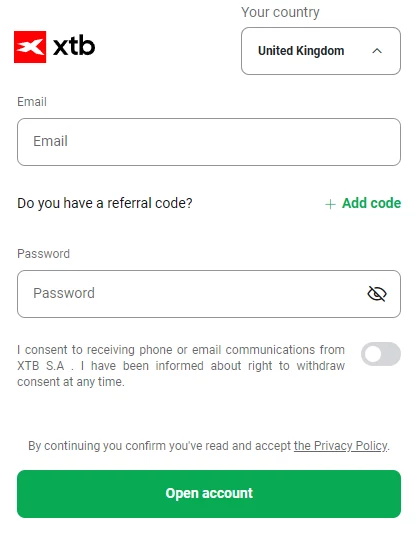
Click “+ Add code” next to “Do you have a referral code?”. 2 Enter the code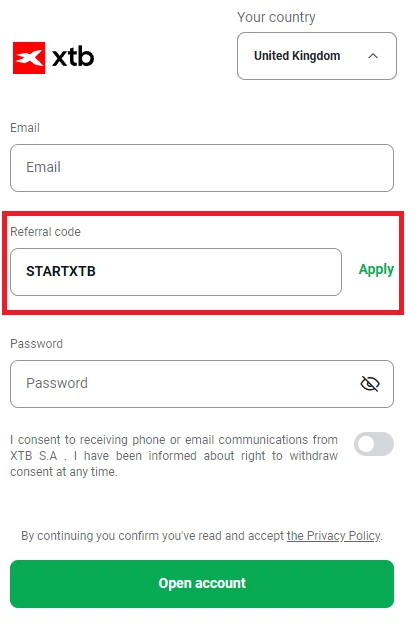
Type STARTXTB into the “Referral code” field and tap “Apply”. If a reward is currently available, you'll see it right after entering and applying the referral code on xtb.com (the Apply button next to the field). You can also skip the browser entirely: download the XTB Online Investing App, install it, and enter the code during sign-up there.
Frequently asked questions
Will I get a financial bonus for using the code?
Is the referral code mandatory?
Can I add the code to an existing account?
What is the difference between a promo code and a referral code?
Entering the referral code is optional and free, and has no negative impact on your account. Trading financial instruments carries the risk of losing your capital; this page is informational and not investment advice. Always check the current terms directly at XTB.
